
1. Three tools
| Tool | What it tells you | Where to open it |
|---|---|---|
| Draw calculator | The chance of drawing at least a set number of a target card | "Draw odds" in Home, or "Tools" on the Solo Play board |
| Combo odds | The chance of having several cards (combo parts) at the same time | "Combo odds" in Home |
| Probability read | Based on the current board, the chance that a hidden zone such as a hand holds a specific card | "Tools" on the Solo Play board |
The draw calculator and combo odds work without any registered cards or decks. The probability read calculates from the Solo Play board and the deck's contents.
2. Draw calculator
- In "Deck settings", enter the deck size, how many copies of the target card are in it, and how many you need (at least).
- In "Draw settings", enter the opening hand size, draws per turn, and up to which turn. For games where the first player does not draw on turn 1, turn on "Going first (no draw on turn 1)".
- The chance of drawing the target card under those conditions appears at the top. "Probability by count" below lets you compare the chance of exactly N or at least N.
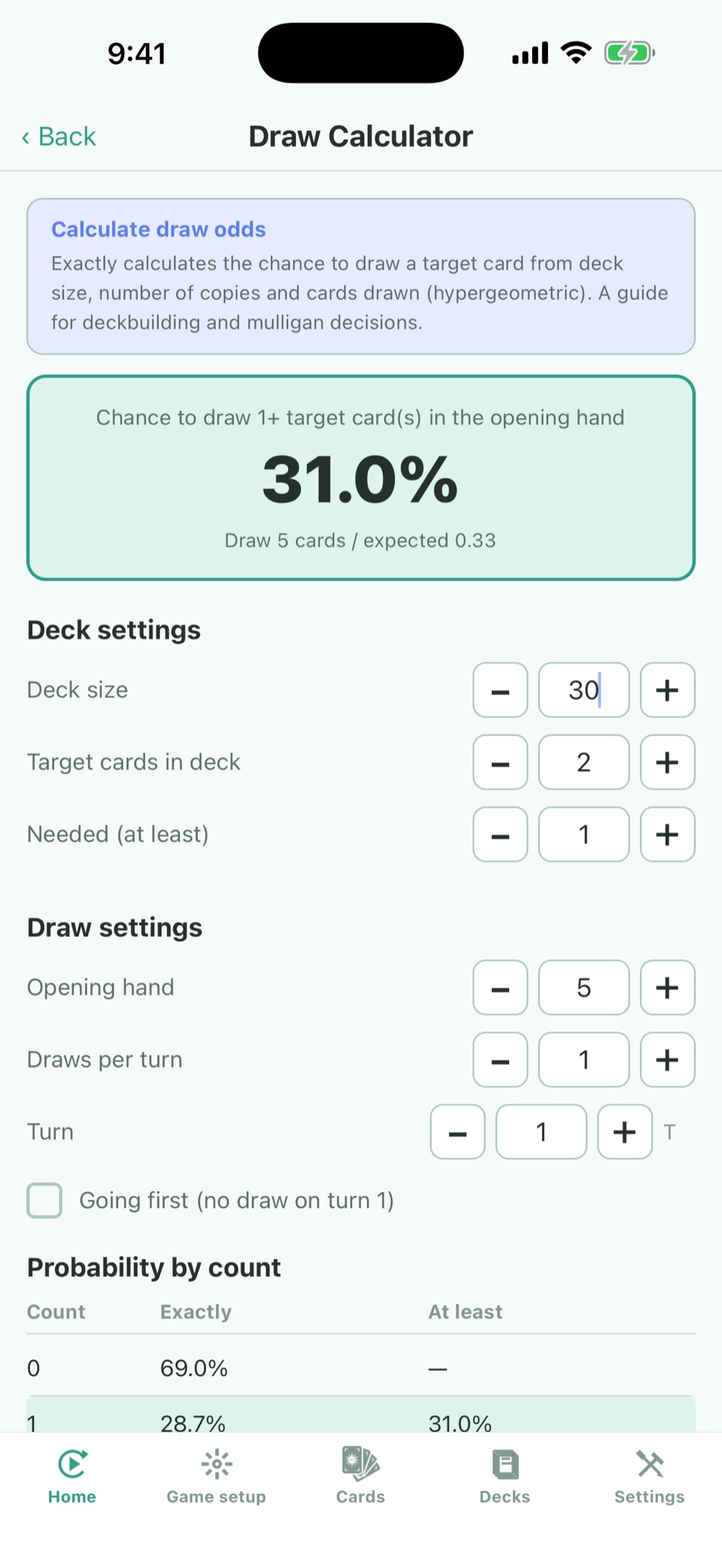
Tap an image to enlarge it. The screens are demos for explanation.
Change the numbers to see, for example, how much the chance goes up when you run 3 copies instead of 2, or what happens over more turns.
3. Combo odds
- Enter the deck size, opening hand, draws per turn and number of turns.
- Under "Combo parts", enter each part's name, how many are in the deck, and how many you need. Two parts are listed to start with; add more with "+ Add part".
- The chance of having every part at or above the count you need appears at the top.
Multiplying the chances of drawing each of two cards does not give the chance of having both at once. Combo odds takes into account that they come from the same deck. If the parts add up to more than the deck size, a warning appears.
4. "Probability read" during Solo Play
On the Solo Play board, open "Tools" at the top right and tap "Probability read". It calculates from the deck's contents and the cards visible on the board.
- Choose yourself or the opponent in "Target player", and a zone such as the hand in "Target zone (hidden cards)".
- Choose a "Question". "Specific card" gives the chance of holding at least a set number of the card you choose. "Sum of a numeric attribute" gives the expected total of a numeric attribute such as cost or power, and the chance it reaches a value you set.
- Below the result, you see the number of unseen cards (unknown pool) and how many cards were counted.
| Setting | When to use it |
|---|---|
| Zones treated as public | Select only zones whose contents are visible. Face-up zones are selected to begin with. |
| Cards to look at | Starts at the number of hidden cards in the target zone. Lower it when thinking about an effect like "look at the top N cards of the deck". |
| Cards to mark as known | Mark cards that were revealed, for example by a search, before going into the hand, to leave them out of the calculation. |
| Pool source pile | The main deck to begin with. Do not include separate piles that never go to the hand (such as an extra deck). |
| A/B compare | Put two questions side by side to see which is more likely. |
To use "Sum of a numeric attribute", create a numeric attribute (such as cost) in the game setup first. For how to create attributes, see the advanced settings guide.
5. How to read the numbers
- The draw calculator and combo odds are exact calculations for drawing from the top of the deck in order. They do not account for effects that change the deck along the way, such as searches or extra draws.
- The probability read uses only the conditions you enter and the information visible on the board. Results change with the opponent's decisions and the zones you choose.
- Use them as a guide for deck size and card counts, and confirm by actually testing in Solo Play.